
Windows
Official setup file for Windows 7 or higher.
Official source
Version 1.4
EXE
917 KB
Official-source download guide
Download the NDM desktop app for Windows or macOS, then add the Chrome or Firefox extension to send browser download links directly to Neat Download Manager.
This independent Neat Download Manager download guide keeps the practical details up front: official source links, version numbers, file sizes, system requirements, extension setup, and common fixes before the longer explanation begins.
Downloads use a 15-second countdown before opening the verified source link.
Official setup file for Windows 7 or higher.
Official DMG installer for OS X 10.10 or higher.
Send Chrome download links to the NDM desktop app.
Connect Firefox downloads with Neat Download Manager.
Version facts
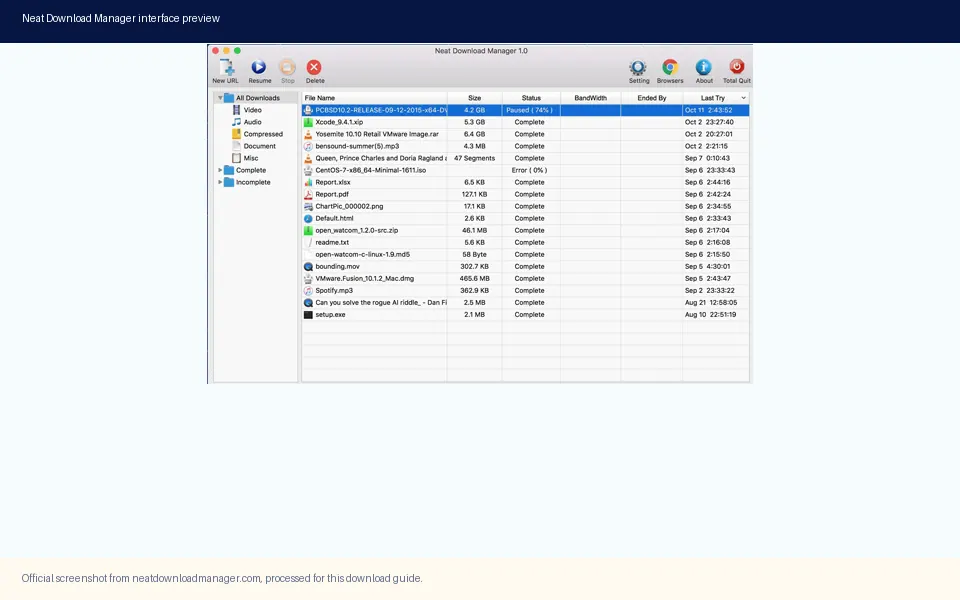
A download page should answer the basic questions before asking users to click. The table below keeps Neat Download Manager version details, platform support, official source status, and extension requirements in one place.
Install flow
The cleanest setup is desktop app first, extension second, test download third. That order matters because the browser extension is a bridge to the desktop app, not a full download manager by itself.
Use the Windows setup file on a PC or the DMG installer on macOS. Check the file type and system requirement before opening the download.
Run the installer, open Neat Download Manager, and confirm the desktop app can create and resume downloads before connecting a browser extension.
Install the Chrome or Firefox extension only after the desktop app is ready. The extension sends compatible browser download links into NDM.
Start with a simple HTTP or HTTPS file. If that works, move on to larger files, video links, bandwidth limits, or more advanced connection settings.
If a link is not captured, check whether NDM is running, the extension is enabled, the browser allows external app handoff, and the target site permits direct downloads.
Extension setup
The Neat Download Manager extension is useful because many users start a download inside the browser. With the extension installed, Chrome or Firefox can pass supported links to the desktop app, where NDM can manage connection count, pause and resume behavior, proxy settings, and file organization.
The most common mistake is installing the extension first and expecting it to download by itself. The extension needs the Neat Download Manager desktop app. If the desktop app is closed, blocked by the operating system, or not registered correctly, the browser extension may appear installed but fail to capture downloads.
For SEO and user experience, this site keeps Chrome and Firefox extension guides as their own pages. Extension users often search with a specific browser name, and those pages can answer permissions, install order, and troubleshooting without making the homepage too crowded.
Install and open NDM before adding the browser extension.
Use Chrome Web Store and Firefox Add-ons rather than unknown extension mirrors.
Encrypted streams, protected media, and some dynamic links may not be available to a download manager.
If you want the browser to handle one download, temporarily disable capture or use the extension's bypass behavior when available.
Common fixes
Troubleshooting pages are important for this site because users often return to Google after installing NDM and seeing a confusing state. These guides focus on the problems that appear in keyword data and real user workflows.
Check whether the desktop app is installed, open, allowed by the system, and connected to the browser extension.
Fix extension issuesHLS videos may download as many .ts segments. NDM may merge those segments after the download stage finishes.
Understand mergingNDM can use dynamic segmentation, but actual speed still depends on the source server, your network, and any bandwidth limits.
Learn how NDM increases speedCompare NDM with IDM, Free Download Manager, Motrix, and JDownloader when a different workflow fits better.
Compare alternativesVerify the official installer, extension source, mirrors, APK claims, and warning signs before trusting an NDM download.
Check NDM safetyFAQ
No. This is an independent Neat Download Manager download and setup guide. It links to official source pages and browser extension stores when available, but it is not affiliated with the official developer.
The official Neat Download Manager page presents NDM as a free internet download manager for Windows and macOS. This site does not sell or repackage the installer.
Use the official Windows setup file named NeatDM_setup.exe. The checked version is 1.4, and the file size returned by the source server is about 917 KB.
Use the official DMG installer named NeatDMInstaller.dmg. The checked version is 1.3, and the file size returned by the source server is about 1.47 MB.
You can use the desktop app directly, but the extension is helpful when you want browser download links to open in NDM. Install the desktop app first, then add the extension.
Some video streams are delivered as HLS segments. NDM may download many .ts parts first and then merge them into one file after the transfer step.
No. Protected streams, encrypted media, login-only content, and some dynamic websites may block direct download manager access. Use NDM only where you have the right to download.
The countdown makes the destination clear before redirecting to an official installer or extension source. It also prevents accidental repeated clicks on direct download links.